
Accessibility Companion
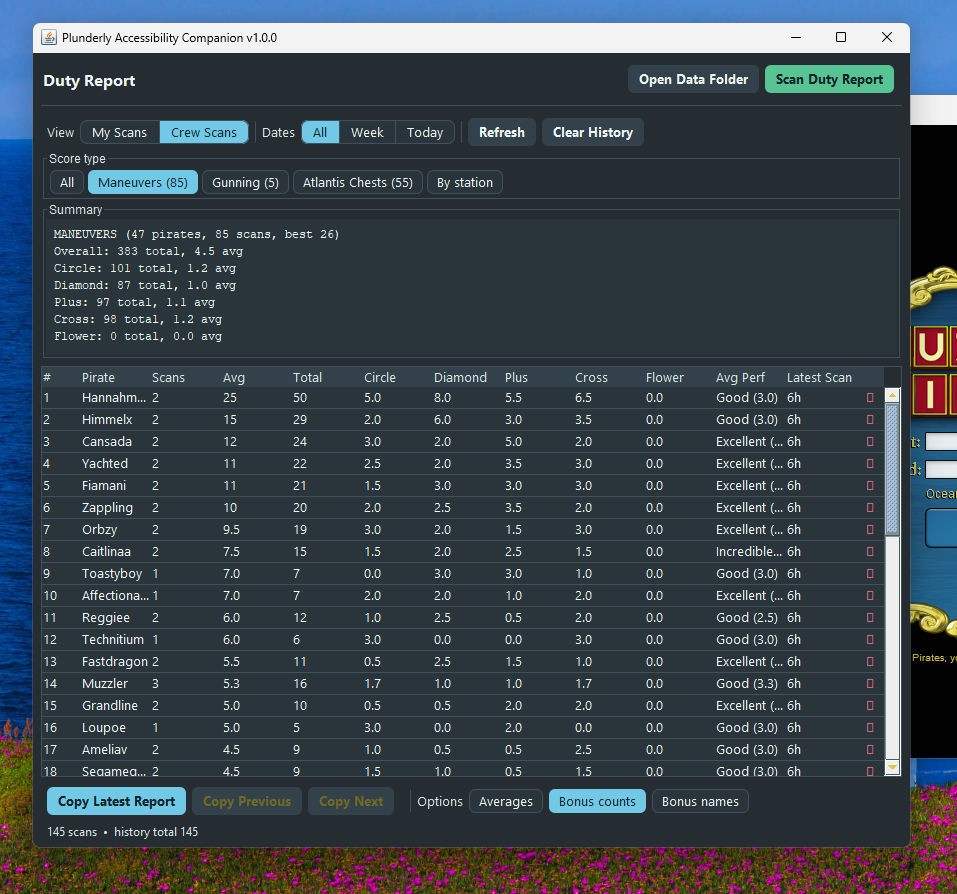
A companion app for Puzzle Pirates that makes Duty Reports easier to read, copy, and save while you play.
Preview
Duty Report window
How it works
Puzzle Pirates already shares on screen information with accessibility tools, like screen readers. This companion uses that same built in access to read the Duty Report and show it in a clearer window.
It does not change anything inside the game itself. Instead it uses extra.txt, a standard startup settings file the game supports precisely so players can load assistive technology like screen readers at launch. If you don't have one yet, setup creates it; if you already do, setup adds the Plunderly startup lines. Nothing the game ships is touched.
The install does not
patch, modify, or repackage the game,
read or alter network traffic,
change anything about gameplay
Installation
Choose the install method you want to use. Manual install gives you the most control; the platform zips do the same setup for you.
1
plunderly.jar from the latest release.2
plunderly.jar into it:%APPDATA%\PlunderlyFor most people, that is C:\Users\YOURNAME\AppData\Roaming\Plunderly.
3
%LOCALAPPDATA%\Puzzle Pirates\appIf that folder does not exist, try %APPDATA%\Three Rings Design\Puzzle Pirates. The right folder usually contains getdown.txt.
4
extra.txt.5
extra.txt, replacing YOURNAME with your Windows username:-Djavax.accessibility.assistive_technologies=Probe
-Xbootclasspath/a:C:\Users\YOURNAME\AppData\Roaming\Plunderly\plunderly.jar6
extra.txt.txt, rename it to exactly extra.txt.1
plunderly.jar from the latest release.2
plunderly.jar into it:~/Library/Application Support/PlunderlyFor most people, that is /Users/YOURNAME/Library/Application Support/Plunderly.
3
/Applications, right-click Puzzle Pirates.app, choose Show Package Contents, then open Contents/app.4
Contents/app folder, create a plain text file named extra.txt.5
extra.txt, replacing YOURNAME with your Mac username:-Djavax.accessibility.assistive_technologies=Probe
-Xbootclasspath/a:/Users/YOURNAME/Library/Application Support/Plunderly/plunderly.jar6
If macOS will not let you save inside the app, open System Settings → Privacy & Security → App Management, allow your editor or terminal, quit and reopen that app, then save again.
1
2
plunderly-windows.zip and unzip it.3
Install-Plunderly.cmd. The window stays open so you can read the result if anything goes wrong.4
If the installer can't find the game, it will say so and stay open. You can point it at the game's folder yourself by running the launcher from a terminal with this extra argument:
$.\Install-Plunderly.cmd -GameDir "C:\Users\you\AppData\Local\Puzzle Pirates\app"1
plunderly-macos.zip and unzip it.2
install.command. macOS may block it the first time; use the notes below if that happens.3
If macOS blocks the installer
First try right-click install.command → Open, then confirm.
If there is no Open button, open System Settings → Privacy & Security, find the blocked install.command message, choose Open Anyway, then run the installer again.
If macOS blocks writing inside Puzzle Pirates, open System Settings → Privacy & Security → App Management, allow Terminal, quit and reopen Terminal, then run the installer again.
Finding the Puzzle Pirates folder
On Windows, try %LOCALAPPDATA%\Puzzle Pirates\app first. If that is missing, try %APPDATA%\Three Rings Design\Puzzle Pirates.
On Windows, you can also right-click the Puzzle Pirates shortcut, choose Open file location, then look for the folder with getdown.txt.
On macOS, open /Applications, right-click Puzzle Pirates.app, choose Show Package Contents, then open Contents/app.
If Puzzle Pirates will not open
If this starts after editing extra.txt, the jar path inside that file is probably wrong. Fix the -Xbootclasspath/a: line, or delete extra.txt so the game can open again. If you still cannot get it working, reach out for support.
Uninstall
If you used an automatic installer, run the matching uninstaller. If you installed manually, fully quit Puzzle Pirates, open the same extra.txt file, delete the two Plunderly lines, save it, then delete plunderly.jar from your Plunderly folder.
Plunderly is an unofficial fan tool, not affiliated with Grey Havens, Three Rings, or Sega. Puzzle Pirates™ is a trademark of Grey Havens.